HairLook: AI Hairstyle Try On
- 3.9
- Rating
- 10.00K
- Installs
- Free
- Price

 Analysis by App-foxy
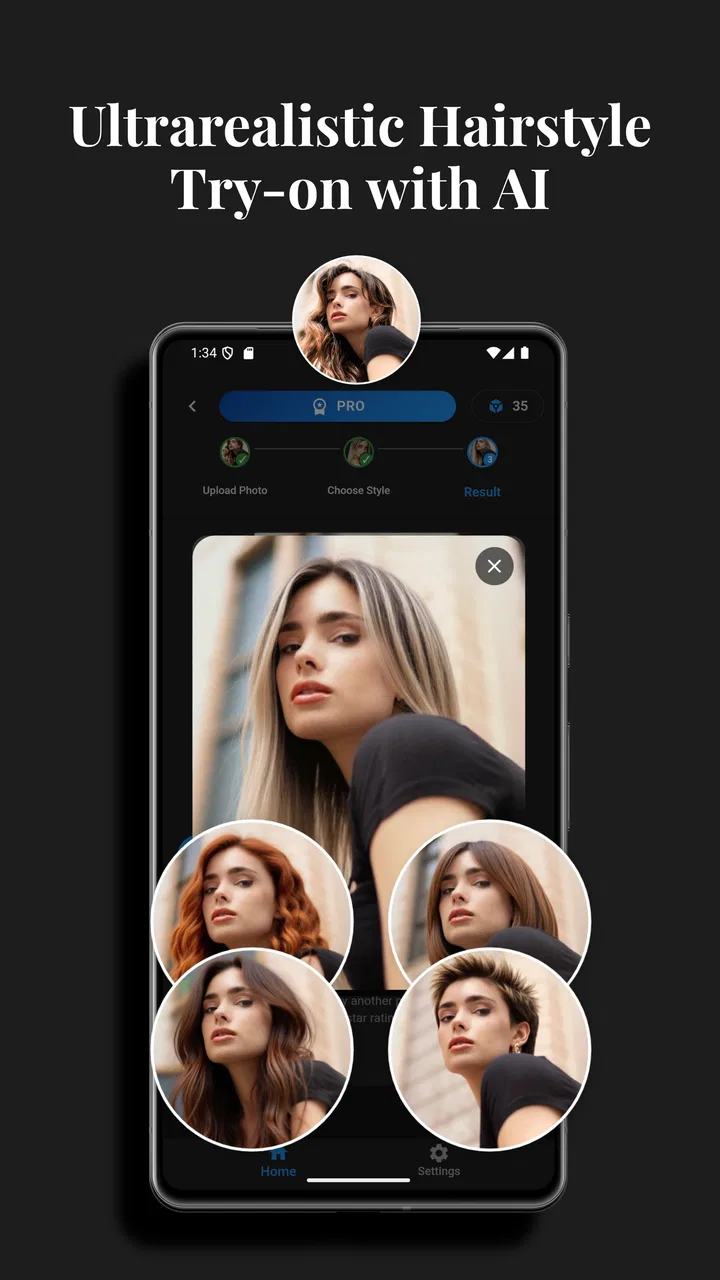
I tried HairLook: AI Hairstyle Try On as a beauty app for the very practical question many of us ask before visiting a salon: “Would that cut or color actually suit me?” Its main appeal is simple. Instead of relying on imagination, you can use an image and preview a different hairstyle, shade, highlights, or balayage before making a real-world change.
That makes it more useful than a collection of inspiration photos. A picture of a celebrity with a particular bob or copper tone can be attractive, but it does not show how the idea might look on your own face. HairLook, developed by Antac S.A.S., is designed to close that gap with AI-based visual previews. My overall impression is positive, especially for early experimentation, although I would treat the results as a conversation starter rather than a precise promise of what a stylist will create.
How HairLook feels in its current version
The app is free to download and sits in the beauty category, with an Everyone age rating. Its current version is 2.8.0, and it supports devices running Android 7.0 or later. That broad compatibility is helpful if you are using an older phone and do not want a hairstyle tool to force a hardware upgrade.
You May Also Like

 AccuWeather: Weather Radar
AccuWeather Review: A Quick, Clear Forecast for Everyday Decisions
For everyday plans, the best forecast is the one you can understand quickly. AccuWeather makes rain timing, radar, and local conditions easy to act on, with a few trade-offs.

 Hill Climb Racing
Why Hill Climb Racing Still Turns Crashes Into One More Run
A tiny car, a bumpy hill and one more upgrade: Hill Climb Racing keeps resurfacing because its simple chaos makes every near-miss feel personal.

 AliExpress - Shopping App
AliExpress Makes Global Shopping Feel Personal, but Shoppers Bear the Risk
AliExpress turns a global marketplace into a pocket-sized discovery engine. Its reach is useful, its shopping loop compelling, and its trade-offs easy to miss.

 Lords Mobile: Kingdom Wars
Lords Mobile Is a Kingdom-Building Routine, Not a Quick Match
A case-by-case verdict on the building, battles, device demands, and social commitments that make Lords Mobile rewarding for some players and exhausting for others.

 PDF Scanner app - TapScanner
TapScanner Makes Paperwork Easier to Capture, Check, and Share
TapScanner makes scanning with a phone feel less like a rescue operation and more like a dependable step in getting work done. Its capture tools are useful, though not flawless.

 Block Blast!
 Shows How Much a Puzzle Game Can Leave Out
A quiet grid game shows why puzzle players increasingly value instant clarity, repeatable skill and low-pressure play—and where the genre still needs to catch up.
More From Our News Desk
View All News


HairLook has reached over ten thousand installs and holds a 4.0 average from roughly five hundred ratings, alongside a smaller collection of written reviews. Those figures suggest a real, established user base without making the app look universally loved. I think that is a fair picture of this type of tool: the basic idea is immediately appealing, but the quality of an AI preview depends heavily on the photo, the hair position, and how closely the chosen style matches the original image.
In everyday use, I would begin with a clear front-facing portrait taken in good light. A neutral expression and hair pulled away from the face make it easier to judge the shape around the forehead, cheeks, and jaw. A heavily filtered selfie, a dark room, or hair covering one side of the face can make the result harder to trust. This is one of the most important practical lessons with AI hairstyle apps: the input image often matters as much as the selected look.
The experience is best understood as visual exploration rather than virtual salon consultation. You can test the direction of a change—shorter, longer, darker, lighter, more layered, or more dramatic—without immediately committing to scissors or color. I found that especially valuable when comparing styles that are difficult to imagine from a written description.
What the app is genuinely good at
The strongest use case is narrowing down possibilities. If you only know that you want “something different,” HairLook can help turn that vague feeling into a shortlist. You might compare a shoulder-length shape with a shorter cut, then see whether warm highlights feel more appealing than a single all-over color. Even when the rendering is not perfect, the exercise can reveal which general direction feels right.
It is also useful for preparing a salon conversation. Rather than showing a stylist several unrelated screenshots, you can arrive with a more focused idea of the length, color family, and overall mood you want. I would still explain that the preview is an approximation, but it can make the discussion less abstract. For a major change, that small improvement in communication is a meaningful benefit.
Another overlooked use is testing combinations, not just individual styles. A haircut may look appealing in isolation, while a particular color changes the impression completely. I recommend first checking the shape with a relatively familiar color, then trying color variations after deciding whether the cut itself works. This two-step approach prevents a striking shade from distracting you from a shape you would not actually want.
HairLook is also a low-pressure tool for people who are curious but cautious. Someone considering bangs, a bold shade, or a shorter silhouette can use it privately before asking friends for opinions. That does not remove uncertainty, but it can make the first decision less intimidating. I would not use it to judge whether a style is objectively flattering; I would use it to identify what I am willing to discuss with a professional.
A practical routine for more believable previews
My recommended workflow is simple. Take several photos rather than relying on one selfie. Keep the camera near eye level, avoid extreme angles, and choose lighting that shows your natural hair and skin tone. If possible, use a plain background and keep accessories away from the hairline. These steps are not glamorous, but they reduce the chance that the app interprets shadows or loose strands as part of the hairstyle.
Next, test the broadest change first. If you are deciding between a long cut and a short one, settle that question before spending time comparing subtle tones. After that, make a small set of comparisons: one conservative option, one realistic change, and one adventurous option. Looking at those three together is more informative than generating many random variations that are difficult to remember.
A useful trick is to review the images later instead of choosing immediately. The first reaction to an unusual color can be excitement or surprise rather than genuine preference. I would save the most convincing options, wait, and then ask whether I still like the shape when the novelty has faded. This is particularly helpful for dramatic transformations.
When showing an image to a stylist, describe what you want to keep and what you want changed. For example, you might like the overall length but not the fullness at the sides, or prefer the color while wanting softer contrast in the highlights. AI previews usually communicate an overall impression better than technical details, so this extra explanation matters.
Where the visual simulation can mislead
The biggest limitation is that a generated preview is not a physical test. Hair texture, density, curl pattern, growth direction, and styling time all affect the real result. A smooth digital version of a layered cut does not tell you whether your hair will naturally fall that way each morning. Likewise, a color preview cannot fully represent how existing dye, gray hair, porosity, or salon lighting will influence the finished shade.
Color is the area where I would be most cautious. Screen brightness and display settings change how tones appear, and the same label can cover a wide range of real salon formulas. A preview may be useful for deciding between a cool and warm direction, but not for choosing an exact dye mixture. If you are planning bleaching or a significant correction, a professional assessment remains much more reliable.
Face shape is another reason not to overinterpret the result. The app can show a hairstyle placed over your image, but styling involves movement, volume, and changing angles. A cut that looks excellent in one still frame may feel different when viewed from the side or when the hair is tied back. I would use the preview to ask better questions, not to guarantee that every angle will work.
Photo quality can create friction too. If the source image is cropped tightly, tilted, or partly obscured, the AI has less useful information. Users who expect a flawless result from any casual selfie may be disappointed. The app becomes more convincing when you treat photo selection as part of the process rather than an afterthought.
How it compares with familiar alternatives
The usual alternative is browsing salon portfolios, social media posts, or image searches. Those sources are excellent for discovering trends and seeing professionally styled hair in detail, but they are not personalized. HairLook offers the opposite advantage: less editorial inspiration, more direct experimentation with your own appearance. I would use both together—browse first to find ideas, then use the app to filter them through your own face and preferences.
A consultation with a stylist is still better when the decision involves technical work. A professional can inspect your current color, assess condition, discuss maintenance, and explain whether a reference image is realistic for your hair. HairLook cannot replace that judgment. Its role is earlier in the process, when you are deciding what to ask for and which possibilities are worth exploring.
Compared with simply editing a photo in a general image editor, a dedicated hairstyle app is more convenient because the purpose is focused. You do not have to manually cut around strands or approximate a fringe with drawing tools. The trade-off is control: a general editor may allow more detailed adjustments, while HairLook is quicker for trying recognizable hairstyle directions.
I also prefer this kind of tool to making a decision from a single stock image, but only if I remember its limits. A stock image shows the style at its best under controlled conditions. A personalized preview at least brings the idea closer to my own proportions, even if it cannot reproduce the physical behavior of my hair.
Costs, access, and the decision to keep using it
HairLook is free to start, which makes casual experimentation easy. It also includes in-app purchases priced from $6.99 to $9.99 per item. I would not pay immediately just because a first preview looks interesting. I would first check whether the free experience answers the specific question I have, then decide whether additional access is worthwhile for a larger comparison session.
This pricing structure matters most to occasional users. If you only want to test one haircut before an appointment, a paid item may feel harder to justify than it would for someone who regularly experiments with colors and styles. The app makes more sense financially when you have a clear project—such as comparing several lengths and color families—rather than when you are opening it with no plan.
Users should also consider how they feel about uploading personal photos to an AI beauty service. I recommend reading the app’s current privacy and purchase information before using a recognizable portrait, especially if you are uncomfortable with image-based tools. That is not a criticism unique to HairLook; it is a sensible checkpoint for any app that transforms personal photos.
Who should use it, and who should skip it
I would recommend HairLook to someone who is undecided, visually minded, and willing to treat AI results as approximate. It is particularly helpful before a first major change, before choosing between several color directions, or when you need a clearer reference for a salon conversation. It can also be enjoyable for low-stakes experimentation when you simply want to see yourself with a different look.
I would be more cautious about recommending it to someone expecting a technical consultation. If your main concern is whether a specific bleach process will work, how much maintenance a color requires, or how a cut will behave with a particular curl pattern, a stylist is the better first stop. The same is true if you need a precise result from a single image and have no patience for trying different photos.
People who dislike digital previews may also find the experience unsatisfying. The app can suggest a direction, but it cannot reproduce the feel of hair, the effort of styling, or the way color changes under different light. If those physical details are what determine your decision, use the app only as a supplement.
What I would like to see as the product evolves
The current version already covers the central idea well: previewing hairstyle changes with AI. The most valuable future improvements would be the ones that make the previews easier to interpret rather than simply more dramatic. Better guidance for taking source photos, clearer separation between haircut and color decisions, and more help understanding the difference between a visual approximation and a salon result would all improve confidence.
I would also watch how the app develops from version 2.8.0 onward. Product evolution is most useful when it reduces uncertainty for existing users, not merely when it adds more choices. If future updates make comparisons more consistent across photos or help users organize a shortlist for a consultation, that would strengthen HairLook’s practical value.
For now, I suggest keeping expectations realistic. The app is most convincing when viewed as a decision aid: it helps me discover what I like, reject ideas quickly, and communicate a preference. It is less convincing when treated as a guarantee of exact length, texture, or color.
My final recommendation is to try HairLook if you are considering a visible change and want a quick, personal way to explore the options. The free entry point lowers the risk of testing it, while the paid items mean I would approach extended use selectively. With a good photo, a structured comparison process, and a final check with a real stylist, HairLook is a useful bridge between vague inspiration and a more confident salon decision.
FAQs for HairLook: AI Hairstyle Try On
01What is HairLook: AI Hairstyle Try On, and how does it work?
HairLook: AI Hairstyle Try On is an image-based beauty app that lets you preview different hairstyles using artificial intelligence. After selecting or taking a photo, you can apply available cuts, lengths, colors, and styling options to create a virtual makeover. The result is intended as a visual reference rather than a guaranteed prediction of how a real haircut or color treatment will look.
02Do I need to upload a photo to use HairLook?
Most of HairLook’s hairstyle preview features require a clear portrait photo, because the app needs to identify your face and hair area before applying a style. For more convincing results, use a front-facing image with good lighting, your hair visible, and minimal obstruction from hats, sunglasses, or heavy filters. Some versions may include sample images or limited options without uploading a personal photo.
03Are the AI hairstyle results accurate enough for choosing a real haircut?
HairLook can be useful for comparing general hairstyle ideas, but its results should not be treated as an exact preview of a salon outcome. AI effects may distort hair texture, facial details, edges, or color, especially in side-profile photos, low lighting, or images with covered hair. It is best to show your favorite generated styles to a professional stylist before making a permanent change.
04Is HairLook: AI Hairstyle Try On free to download and use?
HairLook may be available as a free download, although certain hairstyles, advanced AI tools, export options, or an ad-free experience can require in-app purchases or a subscription. The exact pricing and limits may vary by device, region, and app version. Before confirming a trial or subscription, check the store listing carefully for renewal terms, billing details, and cancellation instructions.
05What happens to the photos I use in HairLook?
Because HairLook processes personal images, you should review its current privacy policy and permission requests before uploading photos. Depending on the app’s design, images may be processed on the device or sent to online servers to generate the hairstyle preview. Avoid using photos containing other people without permission, and remove saved images or revoke photo access through your Android or iOS privacy settings when you no longer need the feature.
Pros
- Offers many hairstyle ideas before making a real change.
- AI previews are quick and easy to generate.
- Useful for comparing short
- long
- curly
- and layered styles.
- Simple interface suitable for casual users.
- Can help users communicate hairstyle preferences to a stylist.
Cons
- Results may look less accurate with poor lighting or side-facing photos.
- Some styles may not match your actual hair texture or volume.
- The most appealing previews may require premium access.
- Generated images can occasionally appear distorted around the face.
- Uploading personal photos may raise privacy concerns for some users.

HairLook: AI Hairstyle Try On
Gallery